Accept escrow-protected payments
The TEDR Merchant API lets your shop create payment orders, hand the customer a checkout link, follow the order through its lifecycle and message the buyer — all over plain HTTPS and JSON. Funds are held in escrow until the buyer confirms delivery, so both sides are protected.
Base URLs
| Environment | Base URL |
|---|---|
| Sandbox / test | https://dev-openapi.tedr.com/api/v1 |
| Production | https://openapi.tedr.com/api/v1 |
Every path in this reference is relative to the base URL and prefixed with /api/v1. All requests and responses are application/json; monetary amounts are always strings to avoid floating-point rounding.
Two order shapes.A multi-product order is the standard checkout — it carries a cart of one or more items and resolves the delivery address by redirect. A single-product order is a lighter, widget/SDK flow for a single item, where TEDR calls your confirmAmountUrl to let you recompute shipping and totals before payment.
What you can build
Single-product checkout
One item, one price, one link. Ideal for invoices, digital goods and “pay this” flows.
Multi-product cart
A full basket with per-item shipping, discounts and photos, rendered as a receipt.
Order chat
Send formatted messages to the buyer from your backend, attached to the order.
Fulfilment updates
Push processing, shipping and delivery states with tracking numbers and URLs.
curl -X POST https://dev-openapi.tedr.com/api/v1/multi-product-orders/init \
  -H "KeyID: $TEDR_KEY_ID" \
  -H "Timestamp: $(date +%s000)" \
  -H "Content-Type: application/json" \
  -d '{
    "orderId": "CART-88120",
    "subTotal": "129.00",
    "shippingCost": "9.00",
    "discount": "0.00",
    "totalCost": "138.00",
    "currency": "USTTETH",
    "successUrl": "https://shop.example.com/thanks",
    "failUrl": "https://shop.example.com/failed",
    "products": [
      { "name": "Mechanical keyboard", "price": "129.00", "quantity": 1, "photos": [], "attributes": [] }
    ]
}'{
"id": "6650b1c2f3a1d40012ab77e1",
"orderId": "CART-88120",
"status": "order_created",
"totalCost": "138.00",
"currency": "USTTETH",
"eosName": "tedrshop1234",
"expiresAt": "2026-08-15T10:22:31.000Z",
"link": "https://tedr.com/pay/6650b1c2f3a1d40012ab77e1"
}Registration
How to obtain credentials and set the webhook that receives your order updates.
API credentials are issued from inside the TEDR app — there is no separate developer portal. To get yours:
- Download and open the TEDR app.
- Open the Service menu and go to the API SHOP section.
- Register your shop — fill in the shop name, shop URL and a default webhook URL (logo and description are optional).
- Once the shop is registered you receive your API Key and API Secret.
These map to the credentials you use on every request:
| Credential | Used as |
|---|---|
| KeyID | The KeyID request header on every authenticated call. |
| Secret | The key used to compute the X-Signature header on Private requests. |
Keep the secret on your server.Anyone holding it can act on behalf of your shop. Never ship it to a browser or mobile client.
The Webhook URL you register is your shop’s default callback. Any order can override it for its own lifetime by setting confirmStatusUrl at creation time — see Webhooks & redirects.
Where to find it in the app
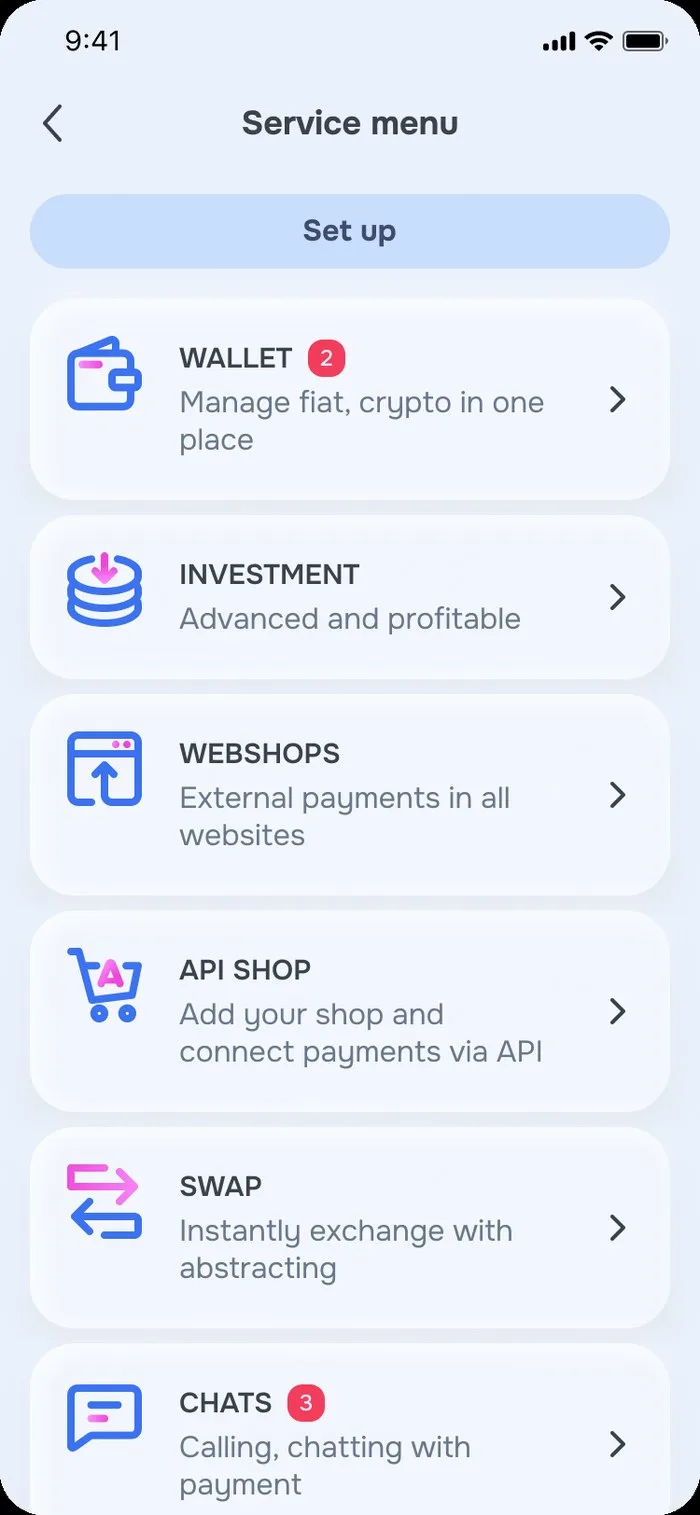
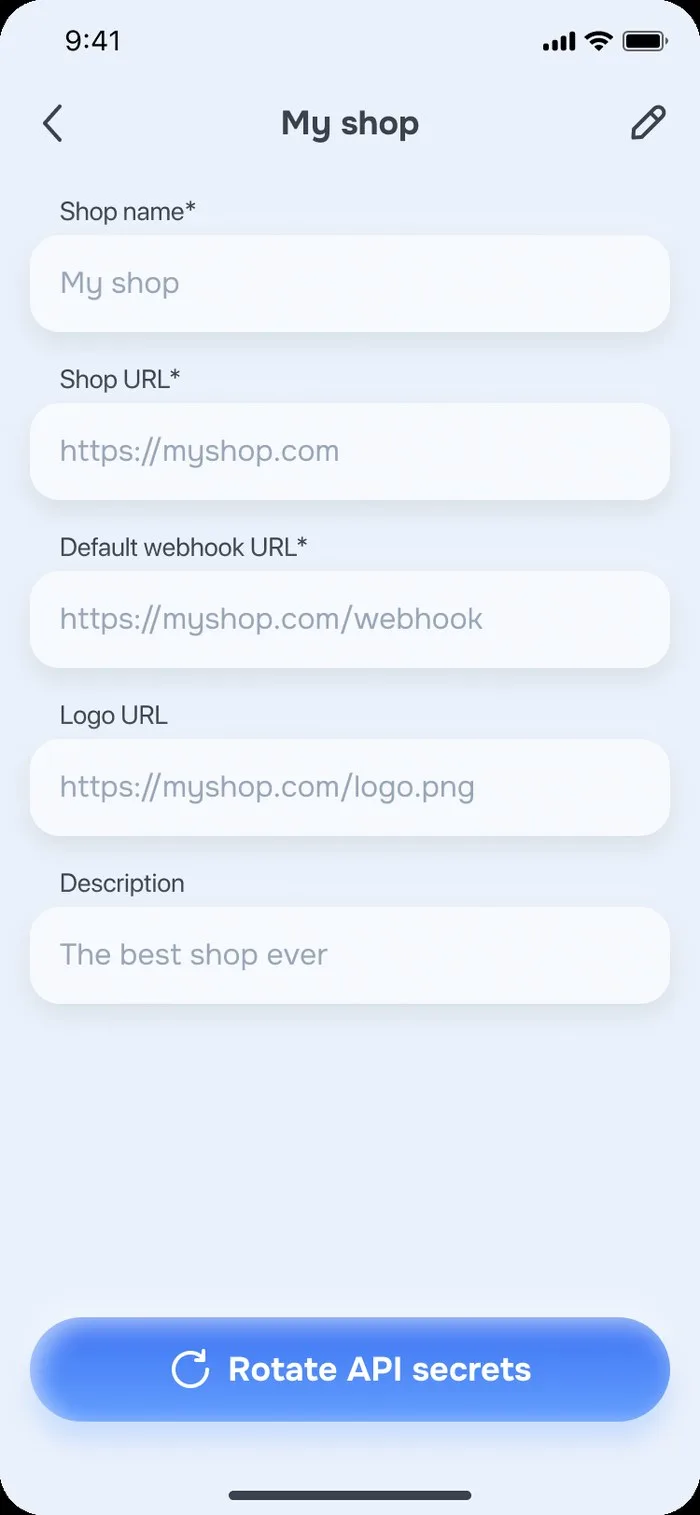
Quickstart
Five steps from credentials to a paid order.
Get credentials
Register your shop to receive a KeyID and a Secret. The secret never leaves your server.
Create the order
POST /multi-product-orders/init with your orderId, the cart and successUrl/failUrl.
Redirect the buyer
Send them to the link in the response — that is the TEDR checkout page.
Receive webhooks
TEDR calls your confirmStatusUrl (or the registered webhook) on every status change.
Fulfil & update
POST /…/setStatus as you process and ship. Escrow releases when the buyer confirms receipt.
Idempotency.orderId is your identifier and must be unique per order in your system. TEDR returns its own id — store both: webhooks and every subsequent call use the TEDR id.
Authentication
Requests fall into three access levels. Most identify your shop with a key ID and a timestamp; state-changing and listing endpoints additionally require an HMAC signature.
Access levels
| Level | Required headers | Used by |
|---|---|---|
| Open | None. | All /enumerations endpoints. |
| Public | KeyID, Timestamp | Order creation and single-order reads. |
| Private | KeyID, Timestamp, Algorithm, X-Signature | Listing, status changes and messages. |
Headers
| Header | Required on | Description |
|---|---|---|
| KeyID | Public, Private | Your application key ID. |
| Timestamp | Public, Private | Current time in milliseconds since the Unix epoch, as a string. Must be close to server time or the request is rejected with 401. |
| Algorithm | Private | HMAC algorithm used for the signature: sha1, sha256, sha384 or sha512. |
| X-Signature | Private | Lowercase hex HMAC of the signed payload (below), keyed with your Secret. |
What gets signed
The signed payload is the Timestamp header value, followed by the request path including the query string, followed — for requests that carry a body — by the JSON body:
- GET (e.g. list):
Timestamp + path, e.g.1779330949362/api/v1/orders?status=order_payed. - POST (e.g. setStatus, messages):
Timestamp + path + JSON.stringify(body).
The body counts.For signed POST requests the request body is part of the signature. Serialize it as compact JSON with no spaces ({"a":"b"}, not { "a": "b" }), keep the field order you send on the wire, and sign the exact same bytes you transmit. The resulting signature must be lowercase hex.
Which endpoints need a signature
| Level | Endpoints |
|---|---|
| Open | All /enumerations endpoints — no headers required. |
| Public | POST /orders/init, GET /orders/{id}, POST /orders/{id}/setStatus, POST /multi-product-orders/init, GET /multi-product-orders/{id} — KeyID + Timestamp only. |
| Private | GET /orders, GET /multi-product-orders, POST /multi-product-orders/{id}/setStatus, POST /messages/{id} — all four headers. |
Note the asymmetry.Per the backend integration guide, single-product POST /orders/{id}/setStatus is Public (no signature), while multi-product POST /multi-product-orders/{id}/setStatus is Private (signed).
# GET (no body): sign timestamp + path
REQ_PATH="/api/v1/orders?limit=20&status=order_payed"
TS=$(date +%s000)

SIG=$(printf "%s" "$TS$REQ_PATH" \
  | openssl dgst -sha512 -hmac "$TEDR_SECRET" -r \
  | cut -d' ' -f1)

curl "https://dev-openapi.tedr.com$REQ_PATH" \
  -H "KeyID: $TEDR_KEY_ID" \
  -H "Timestamp: $TS" \
  -H "Algorithm: sha512" \
  -H "X-Signature: $SIG"
Sign the exact request.If you add, reorder or URL-encode query parameters — or re-serialize the body with different spacing — after computing the signature, verification fails with 401.
Test mode
A shortcut for wiring up the integration before your signing code is ready.
On the sandbox host you may send the literal string API_INTEGRATE as the X-Signature header instead of a real HMAC. This lets you exercise every Private endpoint from Postman or the playground while your backend signing is still in progress.
Never use API_INTEGRATE in production.Switch to real, server-side signatures and re-test every Private endpoint before going live.
The sandbox playground can generate signatures for you and lets you point webhooks at a webhook.site URL to inspect the callbacks TEDR sends.
curl "https://dev-openapi.tedr.com/api/v1/orders?limit=5" \
  -H "KeyID: $TEDR_KEY_ID" \
  -H "Timestamp: $(date +%s000)" \
  -H "Algorithm: sha512" \
  -H "X-Signature: API_INTEGRATE"
Order lifecycle
How an order moves from creation to escrow release — and who moves it.
order_created
You call /init. TEDR returns a checkout link and an expiresAt.
address_confirmed
Buyer opens the link and confirms the delivery address, if the flow requires one.
payment_processing
Payment submitted; TEDR waits for confirmation from the payment provider.
order_confirmed
Funds are held in escrow until delivery is confirmed. This is your green light to ship.
order_processing
You acknowledge the order via setStatus and start preparing it.
order_delivering
setStatus — optionally with tracking info (single-product orders carry trackingNumber/trackingUrl).
order_delivered
You mark the parcel as delivered and notify the buyer.
order_received
Buyer confirms receipt → escrow releases the payment to your shop.
Direct payment
order_payed means the buyer paid without escrow. Such orders end at order_delivered — there is no buyer confirmation step.
Disputes
The buyer can open a dispute (order_disputed). If it resolves in their favour the goods come back and the order lands in order_returned.
Expiry & failure
Unpaid orders reach order_expired after expiresAt. A rejected payment yields payment_failed.
You can only set three statuses.setStatus accepts order_processing, order_delivering and order_delivered. Everything else is driven by the buyer, the payment provider or TEDR itself.
Multi-product start state.If you pass customerEmail at creation, a multi-product order starts in address_confirmed. Without it, the order starts in order_created and moves to address_confirmed once the buyer fills/saves the address during checkout.
Order statuses
The complete set, also available at runtime from GET /enumerations/orderStatuses.
order_delivered. Set by TEDR.Webhooks & redirects
TEDR notifies your backend by calling URLs you control. A default webhook is set at registration; each order may add or override callback URLs at creation time.
Callback & redirect URLs
| Field | When TEDR calls it |
|---|---|
| webhookUrlregistration | Your shop-wide default, set in TEDR App settings at registration. Receives every order-status change unless an order overrides it. |
| confirmStatusUrl | Per-order server-to-server callback on every status transition. Overrides the registered webhookUrl for that order. Use it as your source of truth for “paid”, “received”, “disputed”. |
| confirmAmountUrlsingle-product | Server-to-server, before payment: TEDR asks your backend to confirm the final amounts (items, shipping, total). Single-product flow only — see below. |
| successUrl | Where the buyer’s browser lands after a successful payment. |
| failUrlmulti-product | Browser redirect after a failed payment. Required on multi-product orders. |
| redirectUrlsingle-product | Generic return URL for the buyer. Single-product orders only. |
| backToStoreUrlmulti-product | “Back to store” link shown on the checkout page. Multi-product orders only. |
Status callback
When an order’s status changes, TEDR sends a POST to confirmStatusUrl (or the registered webhookUrl). The body is the full OrderDto or MultiProductOrderDto. Your endpoint must return a 2xx (200 or 201). TEDR retries a failed delivery up to 5 times per order.
- Respond
2xxquickly; do the heavy work asynchronously. - Treat callbacks as hints — re-read the order with GET before shipping anything.
- Make handlers idempotent: the same status may arrive more than once.
- Use unguessable callback paths (include a nonce) and serve them over HTTPS.
Confirm delivery address / amount single-product
In the single-product flow, when the buyer scans the QR and fills in the address, TEDR sends a POST to your confirmAmountUrl so you can recompute shipping and totals before payment.
TEDR sends:
| Field | Type | Description |
|---|---|---|
| orderId | string | The order’s id. |
| address | AddressDto | Delivery address (country is ISO 3166 alpha-2/alpha-3; email optional). |
| signature | string | md5 hex hash of orderId + signKey. Empty string when no signKey is configured. |
Your backend replies:
| Field | Type | Description |
|---|---|---|
| orderIdreq | string | Must equal the id from the request. |
| amountTotalopt | string | Total amount of order. Default: item’s amount. |
| amountItemsopt | string | Amount of items in the order. |
| amountShippingopt | string | Amount of shipping. Default: 0. |
| expiresAtopt | string | ISO 8601; must be later than now. If set, extends the order’s expiry. |
Query parameters are yours.Any query string you put on a callback URL is preserved and echoed back, which makes it a convenient place for your own order reference.
// confirmStatusUrl handler — body is the full order DTO
app.post("/tedr/status", async (req, res) => {
  res.sendStatus(200); // acknowledge with 2xx immediately

  const order = req.body;          // OrderDto | MultiProductOrderDto
  switch (order.status) {
    case "order_confirmed":
      await startFulfilment(order.orderId);
      break;
    case "order_received":
      await markPaidOut(order.orderId);
      break;
    case "order_disputed":
      await alertSupport(order.orderId);
      break;
  }
});{
"orderId": "SHOP-1042",
"amountItems": "129.00",
"amountShipping": "9.00",
"amountTotal": "138.00",
"expiresAt": "2026-08-15T11:00:00.000Z"
}Display currency
Charge in the settlement asset, show the price in the buyer’s money.
currency is the asset the order is actually settled in — the supported values come from GET /enumerations/currencies. Everything prefixed with display is presentation only: you supply the symbol, the rate you used and the already-converted figures, and TEDR renders them next to the settlement amounts.
| Field | Purpose |
|---|---|
| displayCurrency | Any symbol you want shown, e.g. USD, EUR, RUB. |
| displayRate | The rate you used at order-creation time, e.g. "1.25". |
| displayAmount · displaySubTotal | Converted item amount / cart subtotal. |
| displayAmountShipping · displayShippingCost | Converted shipping cost. |
| displayDiscount | Converted discount. |
| displayAmountTotal · displayTotalCost | Converted grand total. |
TEDR does not convert for you.The display figures are stored and rendered exactly as you send them — the rate and the arithmetic are your responsibility.
{
  "orderId": "CART-88120",
  "subTotal": "129.00",
  "shippingCost": "9.00",
  "discount": "0.00",
  "totalCost": "138.00",
  "currency": "USTTETH",
  "successUrl": "https://shop.example.com/thanks",
  "failUrl": "https://shop.example.com/failed",

  "displayCurrency": "EUR",
  "displayRate": "0.92",
  "displaySubTotal": "118.68",
  "displayShippingCost": "8.28",
  "displayDiscount": "0.00",
  "displayTotalCost": "126.96",
  "products": [ /* … */ ]
}
Errors
Standard HTTP status codes. Validation failures return a list of messages; auth failures return a single message.
| Code | Meaning | What to check |
|---|---|---|
| 200 / 201 | Success. | — |
| 400 | Bad request — validation failed. message is a string array. | Missing required fields, amounts not sent as strings, bad ISO country code, malformed expiresAt. |
| 401 | Unauthorized. | Missing required headers, unknown KeyID, unacceptable Timestamp (clock skew), or an invalid X-Signature / signed payload. |
| 500 | Server error. | Retry with backoff; contact support if it persists. |
Keep your server clock in sync with NTP — a drifting Timestamp is the most common cause of unexpected 401s. The second most common is a signature computed over a different path or body than the one actually sent.
{
  "statusCode": 401,
  "message": "Unauthorized"
}{
"statusCode": 400,
"message": [
"currency must be one of the following values: USTTETH",
"totalCost must be a string"
]
}Initialize order
Creates a single-product order and returns a checkout link for the buyer. Meant for the widget/SDK flow.
Body — CreateOrderDto
| Field | Type | Description |
|---|---|---|
| orderIdreq | string | Your own order identifier. Must be unique in your system. |
| namereq | string | Item name shown to the buyer, e.g. "Best ever order". |
| amountreq | string | Item amount, as a decimal string. |
| currencyreq | enum | Settlement asset — see currencies. One of: USTTETH. |
| confirmAmountUrlreq | string | Server-to-server URL TEDR calls to confirm item / shipping / total amounts before payment. |
| totalAmountopt | string | Grand total including shipping, minus discount. |
| discountopt | string | Discount applied to the item. |
| expiresAtopt | date-time | ISO 8601 string; use UTC. After this moment the order becomes order_expired. |
| attributesopt | OrderAttribute[] | Name/value pairs displayed as is on the checkout page. |
| photosopt | string[] | Image URLs for the item. |
| addressopt | InputAddressDto | Pre-filled delivery address. If provided, the order starts in address_confirmed. |
| canResetAddressopt | boolean | Whether the buyer may change the pre-filled address. |
| redirectUrl · successUrl · confirmStatusUrlopt | string | See Webhooks & redirects. confirmStatusUrl overrides the registered webhook. |
| display*opt | string | Presentation-only amounts — see Display currency. |
| cashbackInfoopt | CashbackInfoDto | Cashback percent / amount / currency shown to the buyer. |
Response
201 → OrderDto. Persist id (TEDR's identifier) and send the buyer to link.
curl -X POST https://dev-openapi.tedr.com/api/v1/orders/init \
  -H "KeyID: $TEDR_KEY_ID" \
  -H "Timestamp: $(date +%s000)" \
  -H "Content-Type: application/json" \
  -d '{
    "orderId": "SHOP-1042",
    "name": "Mechanical keyboard",
    "amount": "129.00",
    "totalAmount": "138.00",
    "currency": "USTTETH",
    "confirmAmountUrl": "https://shop.example.com/tedr/amount?ref=1042",
    "confirmStatusUrl": "https://shop.example.com/tedr/status?ref=1042",
    "photos": ["https://cdn.example.com/kb.jpg"],
    "attributes": [{ "name": "Switch", "value": "Brown" }]
}'{
"id": "507f1f77bcf86cd799439011",
"orderId": "SHOP-1042",
"name": "Mechanical keyboard",
"status": "order_created",
"amount": "129.00",
"totalAmount": "138.00",
"eosName": "tedrshop1234",
"currency": "USTTETH",
"expiresAt": "2026-08-15T10:22:31.000Z",
"confirmAmountUrl": "https://shop.example.com/tedr/amount?ref=1042",
"link": "https://tedr.com/pay/507f1f77bcf86cd799439011"
}Get order
Reads the current state of a single-product order. Use this after every status webhook.
Path parameters
| Name | Type | Description |
|---|---|---|
| idreq | string | TEDR order ID, e.g. 507f1f77bcf86cd799439011 — not your orderId. |
Response
200 → OrderDto. Requests for an order that belongs to another shop are rejected with 401.
curl https://dev-openapi.tedr.com/api/v1/orders/507f1f77bcf86cd799439011 \
  -H "KeyID: $TEDR_KEY_ID" \
-H "Timestamp: $(date +%s000)"Query parameters
| Name | Type | Description |
|---|---|---|
| offsetopt | number | Rows to skip. Minimum 0, default 0. |
| limitopt | number | Page size, 1–100. Default 20. |
| sortopt | number | -1 newest first (default) or 1 oldest first. |
| statusopt | enum | Filter by one of the order statuses. |
Sign the full path.The query string is part of the signed payload: sign /api/v1/orders?limit=20&status=order_payed, not /api/v1/orders.
Response
200 → OrdersDto: a pagination block plus an array of OrderDto.
REQ_PATH="/api/v1/orders?limit=20&offset=0&sort=-1&status=order_confirmed"
TS=$(date +%s000)
SIG=$(printf "%s" "$TS$REQ_PATH" \
  | openssl dgst -sha512 -hmac "$TEDR_SECRET" -r | cut -d' ' -f1)

curl "https://dev-openapi.tedr.com$REQ_PATH" \
  -H "KeyID: $TEDR_KEY_ID" \
  -H "Timestamp: $TS" \
  -H "Algorithm: sha512" \
-H "X-Signature: $SIG"{
"pagination": { "offset": 0, "count": 20, "total": 137, "prev": false, "next": true },
"orders": [
{
"id": "507f1f77bcf86cd799439011",
"orderId": "SHOP-1042",
"status": "order_confirmed",
"amount": "129.00",
"totalAmount": "138.00",
"currency": "USTTETH",
"link": "https://tedr.com/pay/507f1f77bcf86cd799439011"
}
]
}Public on single-product orders.Per the backend integration guide this endpoint needs only KeyID + Timestamp — no signature. (The multi-product equivalent is Private.)
Body — InputSetOrderStatusBody
| Field | Type | Description |
|---|---|---|
| statusreq | enum | One of order_processing, order_delivering, order_delivered. |
| trackingNumberreq | string | Carrier tracking number. |
| trackingUrlreq | string | URL where the buyer can track the parcel. |
| messagereq | CreateMessageDto | Message delivered to the buyer alongside the status change. |
| attributesopt | OrderAttribute[] | Extra name/value details shown with the update. |
| cashbackInfoopt | CashbackInfoDto | Cashback granted with this transition. |
Order of operations.Wait for order_confirmed (escrow held) or order_payed before you start fulfilment. Setting a status on an unpaid order returns 400.
Response
200 → BaseResponseDto.
# Public: KeyID + Timestamp, no signature
curl -X POST https://dev-openapi.tedr.com/api/v1/orders/507f1f77bcf86cd799439011/setStatus \
  -H "KeyID: $TEDR_KEY_ID" \
  -H "Timestamp: $(date +%s000)" \
  -H "Content-Type: application/json" \
  -d '{
    "status": "order_delivering",
    "trackingNumber": "JD0002123456789",
    "trackingUrl": "https://dhl.com/track/JD0002123456789",
    "message": { "message": "Your parcel is on its way!" }
}'{
"statusCode": 200,
"message": "OK"
}Initialize multi-product order
Creates a cart-style order with a product list, per-item shipping and totals. Carries one or more items.
Body — CreateMultiProductOrderDto
| Field | Type | Description |
|---|---|---|
| orderIdreq | string | Your order identifier. |
| productsreq | OrderProductDto[] | Line items: name, unit price, quantity, photos, attributes, optional per-item shipping. |
| subTotalreq | string | Sum of the products. |
| shippingCostreq | string | Total shipping. |
| discountreq | string | Total discount. |
| totalCostreq | string | Grand total the buyer pays. |
| currencyreq | enum | Settlement asset. One of: USTTETH. |
| successUrlreq | string | Browser redirect after successful payment. |
| failUrlreq | string | Browser redirect after failed payment. |
| shippingopt | ShippingDto | Order-level carrier and cost. |
| confirmStatusUrlopt | string | Per-order status callback; overrides the registered webhook. |
| backToStoreUrlopt | string | “Back to store” link on the checkout page. |
| customerEmailopt | string | Buyer email for status notifications. Affects the initial status — see note. |
| display* · cashbackInfoopt | — | See Display currency and CashbackInfoDto. |
Initial status depends on customerEmail.With customerEmail the order is created in address_confirmed. Without it, it is created in order_created and becomes address_confirmed after the buyer fills/saves the address during checkout.
Totals are yours to compute.Send subTotal + shippingCost − discount = totalCost; TEDR renders the numbers you provide.
Response
201 → MultiProductOrderDto.
curl -X POST https://dev-openapi.tedr.com/api/v1/multi-product-orders/init \
  -H "KeyID: $TEDR_KEY_ID" \
  -H "Timestamp: $(date +%s000)" \
  -H "Content-Type: application/json" \
  -d '{
    "orderId": "CART-88120",
    "subTotal": "2988.00",
    "shippingCost": "20.00",
    "discount": "10.00",
    "totalCost": "2998.00",
    "currency": "USTTETH",
    "successUrl": "https://shop.example.com/thanks",
    "failUrl": "https://shop.example.com/failed",
    "confirmStatusUrl": "https://shop.example.com/tedr/status?ref=88120",
    "customerEmail": "buyer@example.com",
    "shipping": { "name": "DHL", "shippingCost": "20.00" },
    "products": [
      { "name": "iPhone 14 Plus", "price": "1469.00", "quantity": 2,
        "photos": ["https://cdn.example.com/iphone.jpg"],
        "attributes": [{ "name": "Colour", "value": "Midnight" }] },
      { "name": "USB-C cable", "price": "25.00", "quantity": 2, "photos": [], "attributes": [] }
    ]
}'{
"id": "6650b1c2f3a1d40012ab77e1",
"orderId": "CART-88120",
"status": "address_confirmed",
"subTotal": "2988.00",
"shippingCost": "20.00",
"discount": "10.00",
"totalCost": "2998.00",
"currency": "USTTETH",
"eosName": "tedrshop1234",
"expiresAt": "2026-08-15T10:22:31.000Z",
"link": "https://tedr.com/pay/6650b1c2f3a1d40012ab77e1",
"successUrl": "https://shop.example.com/thanks",
"failUrl": "https://shop.example.com/failed",
"customerEmail": "buyer@example.com",
"products": [ /* … */ ]
}| Name | In | Description |
|---|---|---|
| idreq | path | TEDR multi-product order ID. |
200 → MultiProductOrderDto.
Separate ID space.Multi-product orders are not returned by GET /orders/{id} — use this endpoint and GET /multi-product-orders for them.
curl https://dev-openapi.tedr.com/api/v1/multi-product-orders/6650b1c2f3a1d40012ab77e1 \
  -H "KeyID: $TEDR_KEY_ID" \
-H "Timestamp: $(date +%s000)"| Name | Type | Description |
|---|---|---|
| offsetopt | number | Default 0. |
| limitopt | number | 1–100, default 20. |
| sortopt | number | -1 or 1, default -1. |
| statusopt | enum | Any order status. |
200 → MultiProductOrdersDto.
REQ_PATH="/api/v1/multi-product-orders?limit=50&status=order_payed"
TS=$(date +%s000)
SIG=$(printf "%s" "$TS$REQ_PATH" \
  | openssl dgst -sha256 -hmac "$TEDR_SECRET" -r | cut -d' ' -f1)

curl "https://dev-openapi.tedr.com$REQ_PATH" \
  -H "KeyID: $TEDR_KEY_ID" \
  -H "Timestamp: $TS" \
  -H "Algorithm: sha256" \
-H "X-Signature: $SIG"Set multi-product order status
Fulfilment updates for cart orders. No tracking fields — status and optional cashback only.
Body — InputSetMultiProductOrderStatusBody
| Field | Type | Description |
|---|---|---|
| statusreq | enum | order_processing, order_delivering or order_delivered. |
| cashbackInfoopt | CashbackInfoDto | Cashback granted with this transition. |
200 → BaseResponseDto.
Sign Timestamp + path + JSON.stringify(body). To message the buyer about a cart order, call POST /messages/{id}?multi_product=true separately.
ID="6650b1c2f3a1d40012ab77e1"
REQ_PATH="/api/v1/multi-product-orders/$ID/setStatus"
BODY='{"status":"order_processing"}'          # compact, no spaces
TS=$(date +%s000)
SIG=$(printf "%s" "$TS$REQ_PATH$BODY" \
  | openssl dgst -sha512 -hmac "$TEDR_SECRET" -r | cut -d' ' -f1)

curl -X POST "https://dev-openapi.tedr.com$REQ_PATH" \
  -H "KeyID: $TEDR_KEY_ID" \
  -H "Timestamp: $TS" \
  -H "Algorithm: sha512" \
  -H "X-Signature: $SIG" \
  -H "Content-Type: application/json" \
-d "$BODY"Parameters
| Name | In | Description |
|---|---|---|
| idreq | path | TEDR order ID. |
| multi_productopt | query | Set to true when the ID refers to a multi-product order. |
Body — CreateMessageDto
| Field | Type | Description |
|---|---|---|
| messagereq | string | Plain text, e.g. "Hello, dear customer!". |
| entitiesopt | MessageEntityDto[] | Rich-text ranges: links, bold, italic, underline, strike, hashtag, email, phone. |
The order must be live.Messages are rejected for orders still in order_created or already order_expired, and for orders that belong to another shop.
Entity offsets
offset is a 0-based index into the message text (0–4090) and length is 1–4096. For text_url entities also supply url.
200 → BaseResponseDto.
ID="507f1f77bcf86cd799439011"
REQ_PATH="/api/v1/messages/$ID"
BODY='{"message":"Your order shipped. Track it here.","entities":[{"type":"bold","offset":0,"length":10}]}'
TS=$(date +%s000)
SIG=$(printf "%s" "$TS$REQ_PATH$BODY" \
  | openssl dgst -sha512 -hmac "$TEDR_SECRET" -r | cut -d' ' -f1)

curl -X POST "https://dev-openapi.tedr.com$REQ_PATH" \
  -H "KeyID: $TEDR_KEY_ID" \
  -H "Timestamp: $TS" \
  -H "Algorithm: sha512" \
  -H "X-Signature: $SIG" \
  -H "Content-Type: application/json" \
-d "$BODY"{
"statusCode": 200,
"message": "OK"
}Get enabled schema names
Lists the JSON schema names you can pass to GET /enumerations/{schema}.
No parameters and no authentication headers. Useful as a health check and to discover what the API considers valid before you hard-code anything.
200 → string[]
curl https://dev-openapi.tedr.com/api/v1/enumerations

# ["currencies", "orderStatuses", "hmac"]Get available currencies
Supported settlement assets with their precision and minimum amount.
200 → CurrencyDto[]. Use decimals to format amounts and minimalAmount to validate carts before you call /init.
Read this at runtime.The set of supported assets changes over time — cache the response for minutes, not months, rather than hard-coding currency codes.
[
  {
    "currency": "USTTETH",
    "decimals": 2,
    "minimalAmount": "0.01"
  }
]200 → OrderStatusDto[] — each entry pairs a status code with its human-readable description.
[
  { "status": "order_created",   "description": "Order was created" },
  { "status": "order_expired",   "description": "Order was expired" },
  { "status": "order_confirmed", "description": "Payment held until delivery" }
]200 → string[]. Prefer sha512; sha1 exists for legacy integrations only.
["sha1", "sha256", "sha384", "sha512"]| Name | In | Description |
|---|---|---|
| schemareq | path | A name from GET /enumerations, e.g. currencies, orderStatuses, hmac. |
200 → object — a JSON schema document you can feed straight into a validator such as Ajv. Use these for internal validation of your payloads.
curl https://dev-openapi.tedr.com/api/v1/enumerations/currenciesData models
Every object the API accepts or returns. Fields marked req are required; all amounts are decimal strings.
CreateOrderDto
Request body for POST /orders/init.
| Field | Type | Description |
|---|---|---|
| orderIdreq | string | Your own order identifier. Must be unique in your system. |
| namereq | string | Order item's name. e.g. "Best ever order". |
| amountreq | string | Item amount as a decimal string. e.g. "1". |
| currencyreq | enum | Settlement asset. One of: USTTETH. |
| confirmAmountUrlreq | string | Server-to-server URL TEDR calls to confirm the amounts. |
| discountopt | string | Discount applied to the item. e.g. "0.01". |
| totalAmountopt | string | Grand total including shipping, minus discount. e.g. "1.01". |
| attributesopt | OrderAttribute[] | Attributes will be displayed AS IS. |
| photosopt | string[] | Image URLs for the item. |
| redirectUrl · successUrl · confirmStatusUrlopt | string | Redirect / callback URLs — see Webhooks. |
| displayCurrency · displayRate · displayAmount · displayAmountShipping · displayDiscount · displayAmountTotalopt | string | Presentation-only — see Display currency. |
| cashbackInfoopt | CashbackInfoDto | Cashback details. |
| expiresAtopt | date-time | ISO 8601 (UTC). e.g. "2026-07-16T18:50:53.074Z". |
| addressopt | InputAddressDto | Pre-filled delivery address. |
| canResetAddressopt | boolean | Whether the buyer may replace a pre-filled address. |
OrderDto
A single-product order, as returned by the order endpoints and the status webhook.
| Field | Type | Description |
|---|---|---|
| idreq | string | TEDR order ID. Use this in every subsequent call. |
| orderIdreq | string | The identifier you supplied at creation. |
| namereq | string | Order item's name. |
| statusreq | enum | Current status — see Order statuses. |
| amountreq | string | Item amount. |
| discountopt | string | Discount applied. |
| shippingAmountopt | string | Shipping cost confirmed via confirmAmountUrl. |
| totalAmountreq | string | Grand total the buyer pays. |
| eosNamereq | string | Blockchain account name of your shop. |
| currencyreq | enum | Settlement asset. One of: USTTETH. |
| expiresAtreq | date-time | Moment the order stops accepting payment. |
| confirmAmountUrlreq | string | Amount-confirmation callback recorded on the order. |
| linkreq | string | TEDR checkout URL — send the buyer here. |
| addressopt | AddressDto | Delivery address confirmed by the buyer. |
| newAddressFlowStrategyopt | boolean | Whether the order uses the newer address-confirmation flow. |
| escrowHoldopt | boolean | true while funds are held in escrow. |
| transactionIdopt | string | Payment transaction reference, once paid. |
| attributesopt | OrderAttribute[] | Displayed AS IS. |
| photosopt | string[] | Image URLs for the item. |
| customeropt | string | Opaque buyer identifier. |
| redirectUrl · successUrl · confirmStatusUrlopt | string | URLs recorded on the order. |
| canResetAddressopt | boolean | Whether the buyer may change the address. |
| display* · cashbackInfoopt | — | Presentation amounts and cashback, echoed back. |
OrdersDto
Paginated envelope returned by GET /orders.
| Field | Type | Description |
|---|---|---|
| paginationreq | HttpPaginationDto | Offset, page size and totals. |
| ordersreq | OrderDto[] | The page of orders. |
CreateMultiProductOrderDto
Request body for POST /multi-product-orders/init.
| Field | Type | Description |
|---|---|---|
| orderIdreq | string | Your own order identifier. |
| subTotalreq | string | Subtotal for the products. e.g. "2988.00". |
| shippingCostreq | string | Total shipping cost. e.g. "20.00". |
| discountreq | string | Total discount. e.g. "10.00". |
| totalCostreq | string | Grand total payable. e.g. "2998.00". |
| currencyreq | enum | Settlement asset. One of: USTTETH. |
| productsreq | OrderProductDto[] | List of products. |
| successUrlreq | string | Browser redirect after a successful payment. |
| failUrlreq | string | Browser redirect after a failed payment. |
| shippingopt | ShippingDto | Order-level delivery company. |
| confirmStatusUrlopt | string | Per-order status callback; overrides the registered webhook. |
| customerEmailopt | string | Buyer email; affects the initial status (see Initialize). |
| displayCurrency · displayRate · displaySubTotal · displayShippingCost · displayDiscount · displayTotalCostopt | string | Presentation-only — see Display currency. |
| cashbackInfoopt | CashbackInfoDto | Cashback details. |
| backToStoreUrlopt | string | “Back to store” link shown on the checkout page. |
MultiProductOrderDto
A cart order with its product list. Returned by the multi-product endpoints and the status webhook.
| Field | Type | Description |
|---|---|---|
| idreq | string | TEDR order ID. |
| orderIdreq | string | The identifier you supplied at creation. |
| subTotal · shippingCost · discount · totalCostreq | string | The order totals you supplied. |
| currencyreq | enum | Settlement asset. One of: USTTETH. |
| productsreq | OrderProductDto[] | List of products. |
| shippingopt | ShippingDto | Delivery company. |
| successUrl · failUrlreq | string | Redirect URLs recorded on the order. |
| confirmStatusUrl · customerEmailopt | string | Status callback and buyer email. |
| eosNamereq | string | Blockchain account name of your shop. |
| statusreq | enum | Current status — see Order statuses. |
| expiresAtreq | date-time | Moment the order stops accepting payment. |
| linkreq | string | TEDR checkout URL. |
| transactionId · customeropt | string | Payment reference and opaque buyer identifier. |
| display* · cashbackInfo · backToStoreUrlopt | — | Presentation amounts, cashback and the back-to-store link. |
| fiatTokenizationRequiredopt | string | Set when the payment requires fiat tokenisation. |
MultiProductOrdersDto
Paginated envelope returned by GET /multi-product-orders.
| Field | Type | Description |
|---|---|---|
| paginationreq | HttpPaginationDto | Offset, page size and totals. |
| ordersreq | MultiProductOrderDto[] | The page of multi-product orders. |
OrderProductDto
One line item inside a multi-product order.
| Field | Type | Description |
|---|---|---|
| namereq | string | Product name. |
| pricereq | string | Price per unit. |
| quantityreq | number | Positive integer quantity. |
| photosreq | string[] | Image URLs for this product. |
| attributesreq | OrderAttribute[] | List of product attributes. |
| shippingopt | ShippingDto | Per-product carrier and cost. |
| displayPriceopt | string | Unit price in the buyer's display currency. |
ShippingDto
Carrier and shipping cost, at order or product level.
| Field | Type | Description |
|---|---|---|
| namereq | string | Delivery company name. e.g. "DHL". |
| shippingCostreq | string | Shipping price. e.g. "20.00". |
| displayShippingCostopt | string | Shipping price in a display currency. |
InputAddressDto
Delivery address you may pre-fill when creating an order.
| Field | Type | Description |
|---|---|---|
| countryreq | string | ISO 3166-1 alpha-2 or alpha-3 country code. e.g. "RU". |
| idopt | string | Existing address ID, when reusing a stored address. |
| address · city · region · postalopt | string | Street, city, region/state and postal code. |
| fullName · phone · email · commentopt | string | Recipient name, phone, email and courier note. |
| geoopt | GeoPoint | Optional coordinates. |
AddressDto
Delivery address as stored by TEDR, including its id.
| Field | Type | Description |
|---|---|---|
| idreq | string | TEDR address ID. |
| countryreq | string | ISO 3166-1 alpha-2 or alpha-3 country code. |
| address · city · region · postalopt | string | Street, city, region/state and postal code. |
| fullName · phone · email · commentopt | string | Recipient name, phone, email and courier note. |
| geoopt | GeoPoint | Optional coordinates. |
GeoPoint
Latitude / longitude pair attached to an address.
| Field | Type | Description |
|---|---|---|
| latreq | number | Latitude. e.g. 56.477956. |
| lonreq | number | Longitude. e.g. 84.965033. |
OrderAttribute
Free-form name/value detail rendered as is on the checkout page.
| Field | Type | Description |
|---|---|---|
| namereq | string | Attribute name. |
| valuereq | string | Attribute value. |
| entitiesopt | MessageEntityDto[] | Rich-text ranges applied to value. |
MessageEntityDto
Rich-text range inside a message — links, bold, italic and friends.
| Field | Type | Description |
|---|---|---|
| typereq | enum | One of text_url, hashtag, email, bold, italic, phone, underline, strike. |
| offsetreq | number | Integer in range 0..4090 inclusive. |
| lengthreq | number | Integer in range 1..4096 inclusive. |
| urlopt | string | Target URL, required for text_url entities (length 1..4096). |
CreateMessageDto
Message payload used by POST /messages/{id} and inside single-product setStatus.
| Field | Type | Description |
|---|---|---|
| messagereq | string | Message text shown to the buyer. |
| entitiesopt | MessageEntityDto[] | Rich-text ranges inside message. |
InputSetOrderStatusBody
Request body for POST /orders/{id}/setStatus.
| Field | Type | Description |
|---|---|---|
| statusreq | enum | One of order_processing, order_delivering, order_delivered. |
| trackingNumberreq | string | Order's tracking number. |
| trackingUrlreq | string | Order's tracking number URL. |
| messagereq | CreateMessageDto | Message to the buyer. |
| attributesopt | OrderAttribute[] | Extra details displayed with the update. |
| cashbackInfoopt | CashbackInfoDto | Cashback details. |
| Field | Type | Description |
|---|---|---|
| statusreq | enum | One of order_processing, order_delivering, order_delivered. |
| cashbackInfoopt | CashbackInfoDto | Cashback details. |
CashbackInfoDto
Cashback shown to the buyer for an order.
| Field | Type | Description |
|---|---|---|
| percentopt | number | Cashback rate, e.g. 0.1 for 10%. |
| amountopt | string | Cashback amount. e.g. "10". |
| currencyopt | string | Cashback currency. Defaults to the order currency. |
CurrencyDto
A supported settlement asset.
| Field | Type | Description |
|---|---|---|
| currencyreq | enum | Currency code. One of: USTTETH. |
| decimalsreq | number | Number of decimal places. e.g. 2. |
| minimalAmountreq | string | Smallest amount accepted for this currency. e.g. "0.01". |
OrderStatusDto
A status code paired with its human-readable description.
| Field | Type | Description |
|---|---|---|
| statusreq | enum | Status code — see Order statuses. |
| descriptionreq | string | Human-readable description of the status. |
HttpPaginationDto
Pagination block returned with every list endpoint.
| Field | Type | Description |
|---|---|---|
| offsetreq | number | Offset of the first row in this page. |
| countreq | number | Number of rows in this page. |
| totalreq | number | Total rows matching the filter. |
| prevreq | boolean | Whether a previous page exists. |
| nextreq | boolean | Whether a next page exists. |
BaseResponseDto
Generic acknowledgement body returned by setStatus and messages.
| Field | Type | Description |
|---|---|---|
| statusCodereq | number | HTTP status code, echoed in the body. Defaults to 200. |
| messagereq | string | Human-readable result, e.g. OK. For 400 errors this is a string array instead. |